
Pi-Bolt: the same Pi, compiled to native code
How we compile the Pi coding agent ahead of time into one native executable, and why most of the speed came from doing less work: 112× faster large file writes and 13× less CPU while streaming than Pi on Node.
 OpenSecOct 21, 2026·7 min read
A coding agent is the program you leave running all day. It sits in a terminal pane, streams answers you only half read, writes files you didn't ask to see, and keeps a conversation open for hours. So the cost that matters isn't one benchmark. It's how much CPU, memory and patience the agent spends while it waits on the model.
Pi is the coding agent we use every day. It's small, it's extensible, and it gets out of the way. It also runs on Node or Bun, so every launch parses its JavaScript again. And as we found out, a long answer, a large file or a long session makes it redo far more work than it needs to.
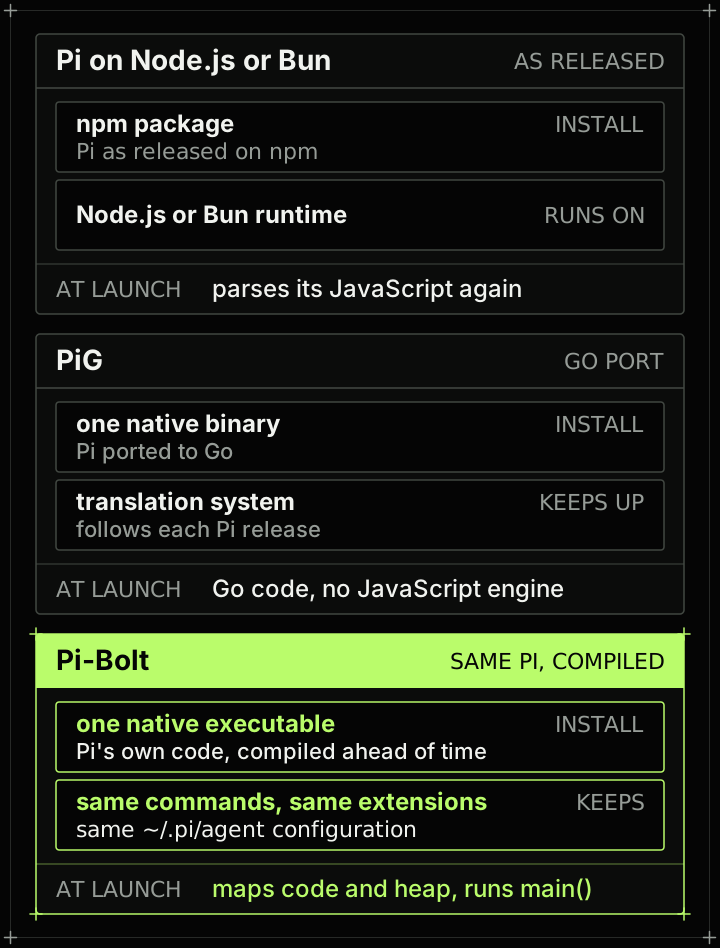
Pi-Bolt is our answer to that. It's the same Pi, compiled ahead of time to native code: same commands, same extensions, same ~/.pi/agent configuration. It's open source and MIT licensed, and runs on Linux (x86-64 and ARM64), macOS on Apple silicon and Windows. Android, in Termux, is supported but not benchmarked.
Why not a rewrite
There are good ways to make Pi native. PiG ports Pi to Go, with a translation system that follows each Pi release. In our runs it starts sooner and uses less memory than Pi-Bolt: on Linux x86-64 it's ready to type in 15 ms against our 42, with a 66 MB peak against 154 (Pi-Bolt 0.9.6, PiG 0.5.1). We have a lot of respect for how carefully it's built.
We wanted something different: Pi's own code, unchanged in behavior, so that every Pi extension, theme and setting keeps working, and each Pi release can become a Pi-Bolt release without a port to catch up. That ruled out a rewrite. It left one question: can you compile a TypeScript program the way you compile a C program, once, before anyone runs it?
How it works
Pi-Bolt's build takes a Pi release, with a small set of fixes on top, and turns it into one executable.
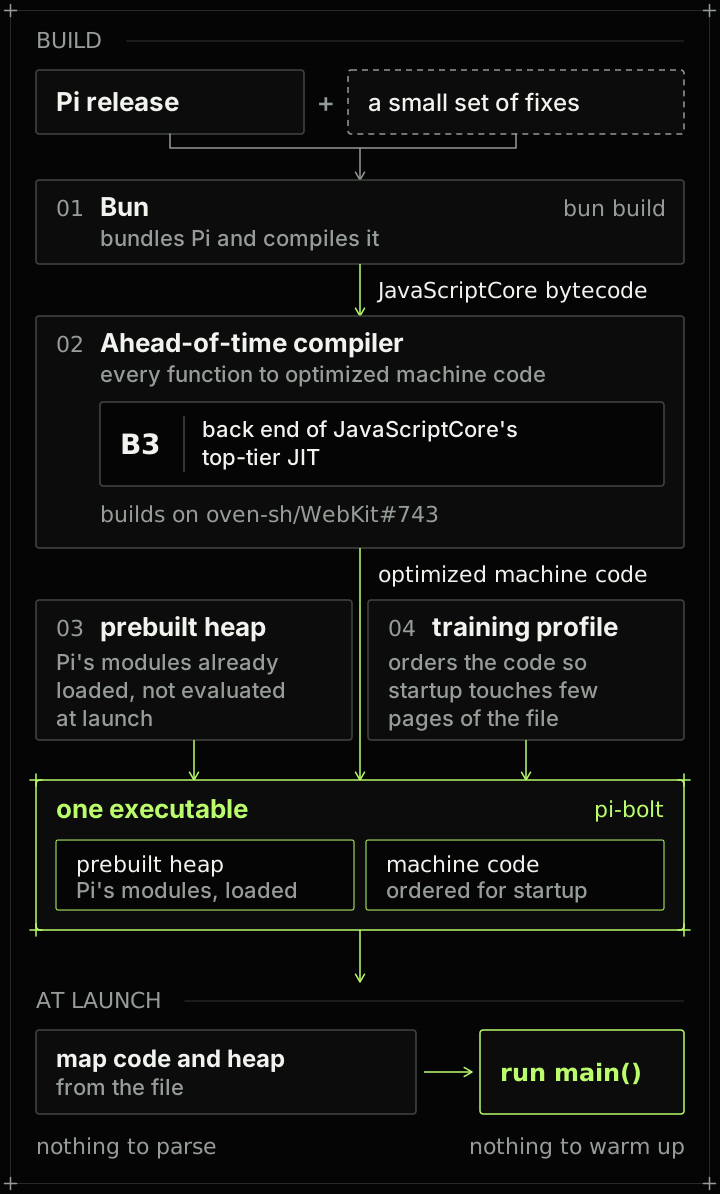
- Bun bundles Pi and compiles it to JavaScriptCore bytecode.
- An ahead-of-time compiler turns every function into optimized machine code through B3, the back end of JavaScriptCore's top-tier JIT. It builds on oven-sh/WebKit#743. We ported it to x86-64 and macOS and added our own code generation and runtime work.
- A prebuilt heap holds Pi's modules already loaded, so they don't have to be evaluated at launch.
- A training profile orders the code so that startup touches as few pages of the file as possible.
At launch there is nothing to parse and nothing to warm up. The executable maps its code and heap from the file and runs main().
That's the part everyone expects from "compiled to native code". It's also the smallest part of the story.
The speed was mostly in doing less work
When we measured where Pi's CPU actually went, launch was the small part. The real cost was work that grew faster than the task itself. Three places stood out.
Streaming an answer
A model streams its answer a few words at a time. Each time, stock Pi redraws the message: it re-lexes the whole Markdown, re-wraps every block and re-highlights every code block. The first chunk is cheap. The thousandth chunk redoes everything the first 999 did.
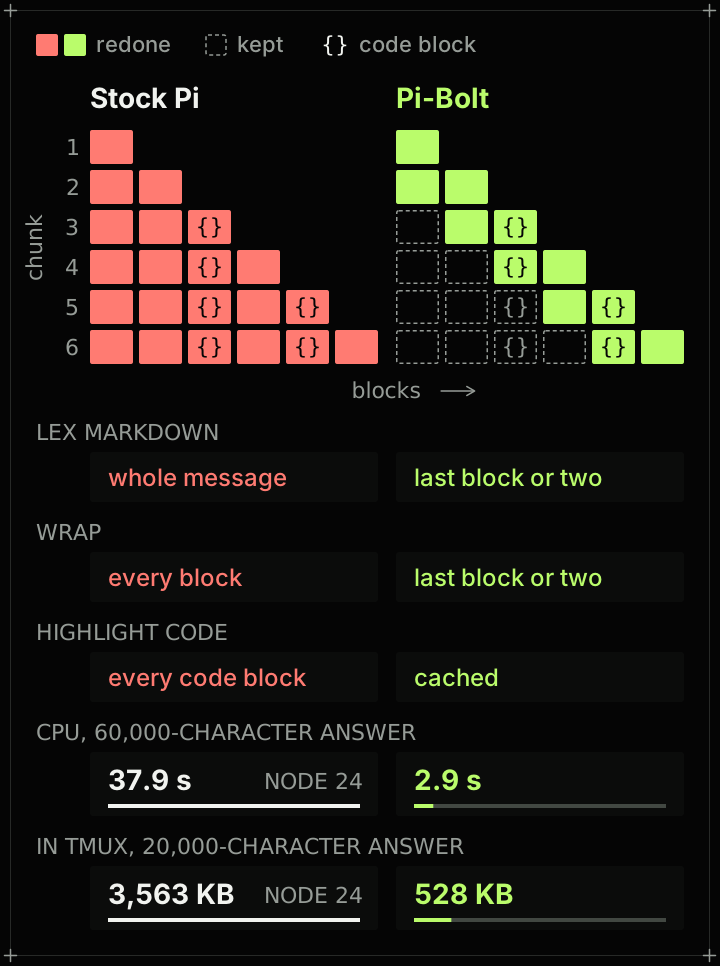
Pi-Bolt keeps what it has already rendered and redoes only the last block or two, with highlighted code cached. The screen shows the same output, line for line. For a 60,000-character answer, that's 2.9 seconds of CPU instead of 37.9 on Node 24. In tmux, the same change cuts what Pi sends to the terminal for a 20,000-character answer from 3,563 KB on Node 24 to 528 KB.
Writing a large file
A model writes a file by streaming the write tool call's arguments, the whole file, a few characters at a time. A 400 KB file arrives in thousands of chunks. For each one, stock Pi parses the entire tool call again, redraws the screen even when nothing shown has changed, and highlights every line of the file.
Pi-Bolt parses the arguments again only once they've grown by an eighth, and once in full when the call completes. It draws a frame only when what's shown changes, and highlights only the lines a collapsed call shows. On Linux x86-64, writing that 400 KB file takes 1.3 seconds, against 146 seconds on Node 24 and 182 on Bun.
Long sessions
Every request sends the whole conversation to the model again. Stock Pi serializes all of it from scratch each time, so each prompt costs more than the last.
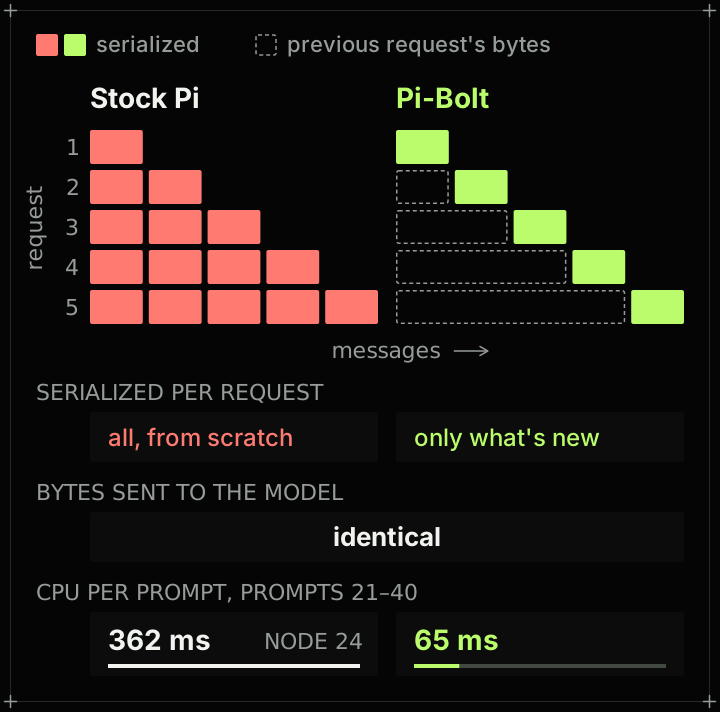
Pi-Bolt builds each request from the previous one's bytes plus what's new. The bytes sent to the model are identical; the work isn't. Between prompts 21 and 40 of a session, Pi-Bolt spends 65 ms of CPU per prompt, against 362 ms on Node 24.
None of these fixes needs a compiler, and that matters for how we measure. Pi-Bolt's code on Bun would carry them too, so "Pi on Bun" in our benchmarks is Pi as released: the Pi you'd actually install.
The numbers
Every build does the same work against the same local model, which replays the same responses, so there's no network or provider noise. Builds take turns on the same machine. We ran Pi-Bolt 0.9.7 against Pi 1.3.0 as released on npm, run by stock Bun 1.4.2, Node 22 and Node 24, on GitHub's Linux x86-64, Linux ARM64, macOS and Windows runners.
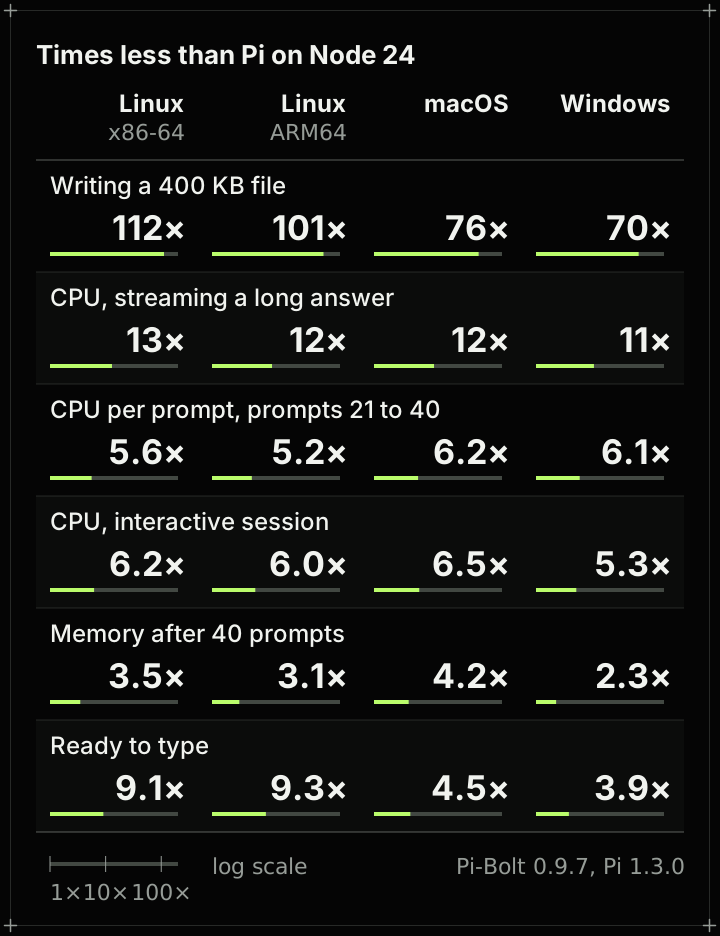
On Linux x86-64, pinned to one CPU, against Pi on Node 24. The long answer is 60,000 characters, CPU per prompt is the average over prompts 21 to 40, and memory is after 40 prompts:
| On Linux x86-64 | Pi-Bolt | Node 24 |
|---|---|---|
| 400 KB file write | 1.3 s | 146 s |
| CPU, long answer | 2.9 s | 37.9 s |
| CPU per prompt | 65 ms | 362 ms |
| CPU per session | 190 ms | 1,179 ms |
| Memory | 166 MB | 578 MB |
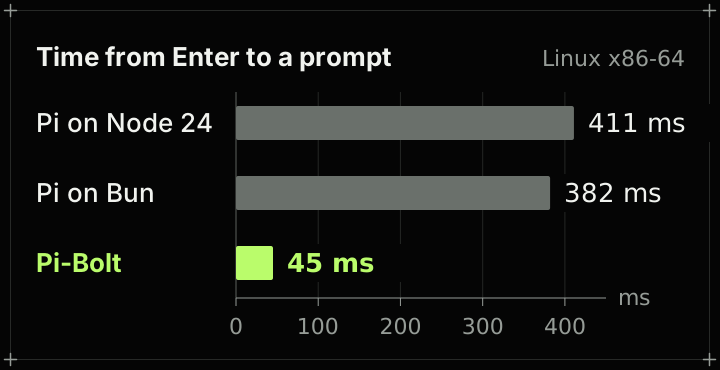
| Ready to type | 45 ms | 411 ms |
PiG still starts sooner and uses less memory: a Go binary doesn't carry a JavaScript engine. Pi-Bolt's advantage is that it runs Pi's own code, so everything built for Pi works unchanged. The raw data, the scripts and the method are in the repository's BENCHMARKS.md.
Extensions and the JIT build
Pi's own code is compiled to machine code. An extension you install at run time isn't: the default build has no JIT, so it's interpreted. Light extensions don't notice. Heavy ones do, so there are two ways out.
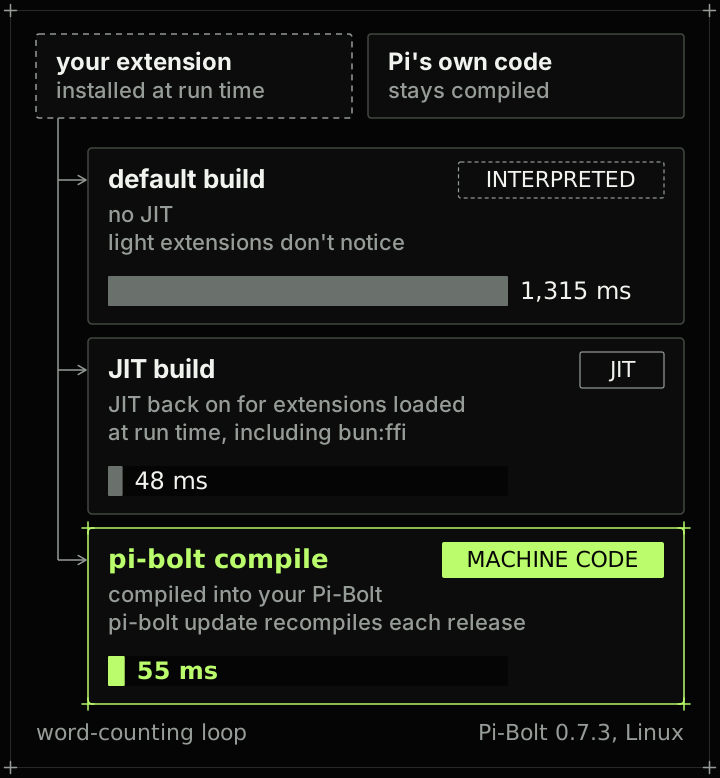
pi-bolt compilecompiles the extensions installed on your machine into your Pi-Bolt, with the release's own compiler.pi-bolt updatecompiles them into each new release.- The JIT build turns the JIT back on for extensions loaded at run time, including ones that call native libraries through
bun:ffi. Pi itself stays compiled. In our plugin benchmark, a word-counting loop takes 1,315 ms interpreted, 48 ms with the JIT build and 55 ms compiled in (Pi-Bolt 0.7.3, Linux).
The installer also offers three extensions we maintain for Pi-Bolt: subagents, a live todo list and fast file search. It asks before installing any of them.
Release signing
Every release's checksums are signed with an Ed25519 release key. The installer and pi-bolt update check the signature and the checksum before installing anything, and pi-bolt update --rollback puts back the build an update replaced. pi-bolt doctor prints a plain-text report of your installation to paste into an issue, without keys or tokens.
Try it
On Linux, macOS and Android (Termux):
curl -fsSL https://pi-bolt.opensec.in/install.sh | sh
On Windows, in PowerShell:
irm https://pi-bolt.opensec.in/install.ps1 | iex
It installs next to Pi as pi-bolt and uses your configuration as it is, so you can try it on today's work and switch back anytime.
Pi-Bolt is on GitHub, and the documentation is at pi-bolt.opensec.in. If something feels slow in your setup, open an issue and tell us what you were doing. We'll measure it, and that's usually how the next fix starts.
OpenSec
The team building OpenSec.